Drop-in Childcare Case Study
Context
When visitors arrive at a drop-in child care centre, staff need to record the number of people entering to keep accurate attendance records to support emergency preparedness and help with future program planning.
Right now, caregivers sign in using paper forms and clipboards, which can be slow and require staff to manually manage and organize the records.
The Ask
The organization wanted to explore a simple self-service check-in process using Apple iPads to make sign-in easier for caregivers, improve the accuracy of attendance tracking, and reduce administrative work. The project also aligned with potential grant funding opportunities that could help cover implementation costs.
Research
To better understand user needs and behaviours, I designed and conducted a survey with parents and caregivers during three childcare sessions over two days. Working alongside a teammate, we gathered feedback from 63 respondents.
The findings were compiled into a findings report that was presented to stakeholders highlighting key usability concerns and behavioural patterns.
One of the clearest insights was the importance of speed and simplicity during check-in. Many caregivers were managing multiple children and found lengthy administrative tasks frustrating during drop-off.
Research focused on:
- Caregiver check-in behaviours
- Pain points with the paper-based process
- Comfort with digital check-in
- Priorities during drop-off and sign-in
UX Artifacts
In-person survey [PDF]
Findings report [PDF]
Stakeholder presentation [PDF]
Ideation & Workflow Design
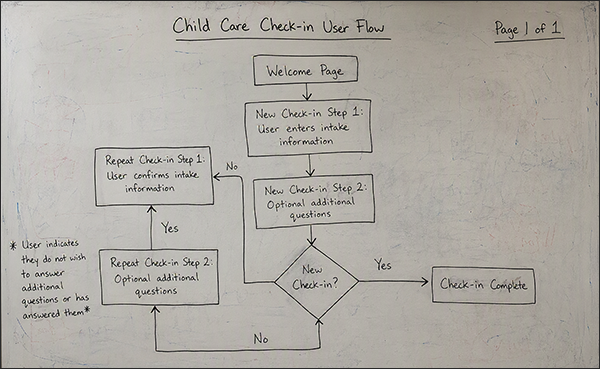
Through collaborative sketching workshops, brainstorming sessions, and knowledge-transfer meetings, I worked with the business team to determine the user flow.
Stakeholders initially wanted to include more than 10 demographic questions during check-in. Based on the research findings, I identified this as a potential source of friction that could negatively affect usability and increase sign-in times.
Although I had concerns about the number of required questions, I recommended including them in the initial prototype so assumptions could be validated through user testing rather than stakeholder opinion alone.
UX Artifacts
Wireframing & User Testing
The user testing prototype confirmed that the additional demographic questions significantly slowed the check-in process and created frustration for caregivers. Based on the results, the workflow was simplified in the next wireframe iteration to reduce the number of required inputs during sign-in.
Outcome
Partway through the project, the funding intended for purchasing iPads was lost, and the initiative was paused before development began.
Despite the project ending early, the work successfully:
- validated key assumptions through research and testing
- aligned stakeholders around user needs and workflow priorities
- identified usability risks before implementation
- produced refined wireframes for a simplified digital check-in experience
This project reinforced the value of evidence-based design decisions and demonstrated how user testing can help shift stakeholder priorities toward real user needs.
UX Artifacts